> ## Documentation Index
> Fetch the complete documentation index at: https://help.sonto.app/llms.txt
> Use this file to discover all available pages before exploring further.
# Focus
> A full-screen, distraction-free view of a single task
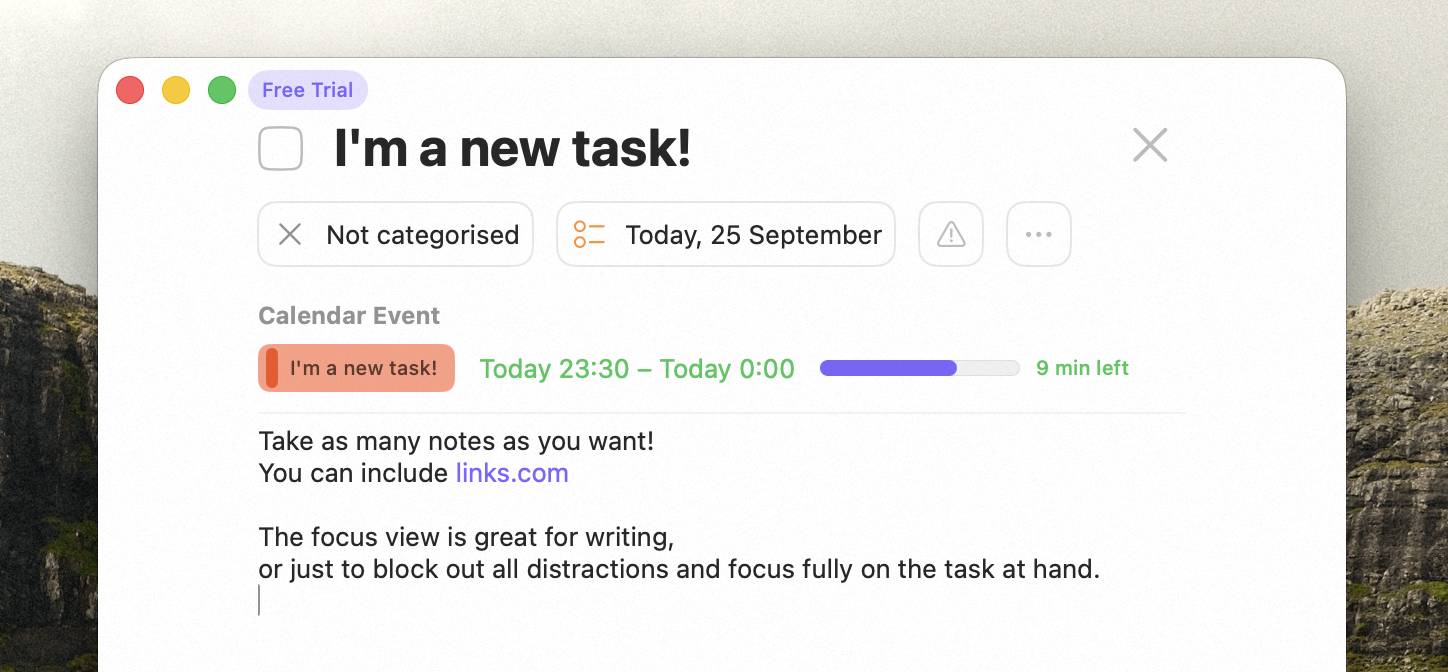
Focus gives you a single task, full screen, with everything else out of the way — ideal for writing or
deep work.
The name field here understands [natural language input](/reference/natural-language-input) too, so you
can reschedule, time-block, or retag the task just by typing.
## Focus view on Mac
Select a task and choose **Focus** from the Task menu or the context menu, or press
Cmd + .. The task fills the screen so you can give it your full attention.
If the task is scheduled on your calendar, Focus shows its time. If it's scheduled for **now**, it shows
how much time you have remaining.
 ## Focus mode on iPhone
iPhone has its own **Focus mode** — the same idea of zeroing in on one task, distraction-free.
## Availability
Focus is available on both **Mac** (Focus view, Cmd + .) and **iPhone** (Focus
mode).
## Related
Editing and scheduling tasks.
Focus is great for writing notes.
## Focus mode on iPhone
iPhone has its own **Focus mode** — the same idea of zeroing in on one task, distraction-free.
## Availability
Focus is available on both **Mac** (Focus view, Cmd + .) and **iPhone** (Focus
mode).
## Related
Editing and scheduling tasks.
Focus is great for writing notes.