> ## Documentation Index
> Fetch the complete documentation index at: https://help.sonto.app/llms.txt
> Use this file to discover all available pages before exploring further.
# Import from Other Apps
> Bring your tasks into Sonto from Apple Reminders, Todoist, and Things
Switching to Sonto? You can bring your existing tasks with you. Sonto imports from **Apple Reminders**,
**Todoist**, and **Things 3**.
Importing is part of the **Manage Data** window on Mac — open the **Sonto** menu, choose **Manage
Data**, then the **Import** tab.
Importing only **adds** to Sonto — nothing already in Sonto is changed or removed. If you import
twice, you'll get duplicates (tags with the same name are merged). After fetching your data, Sonto
shows you a list so you can choose exactly what to bring in.
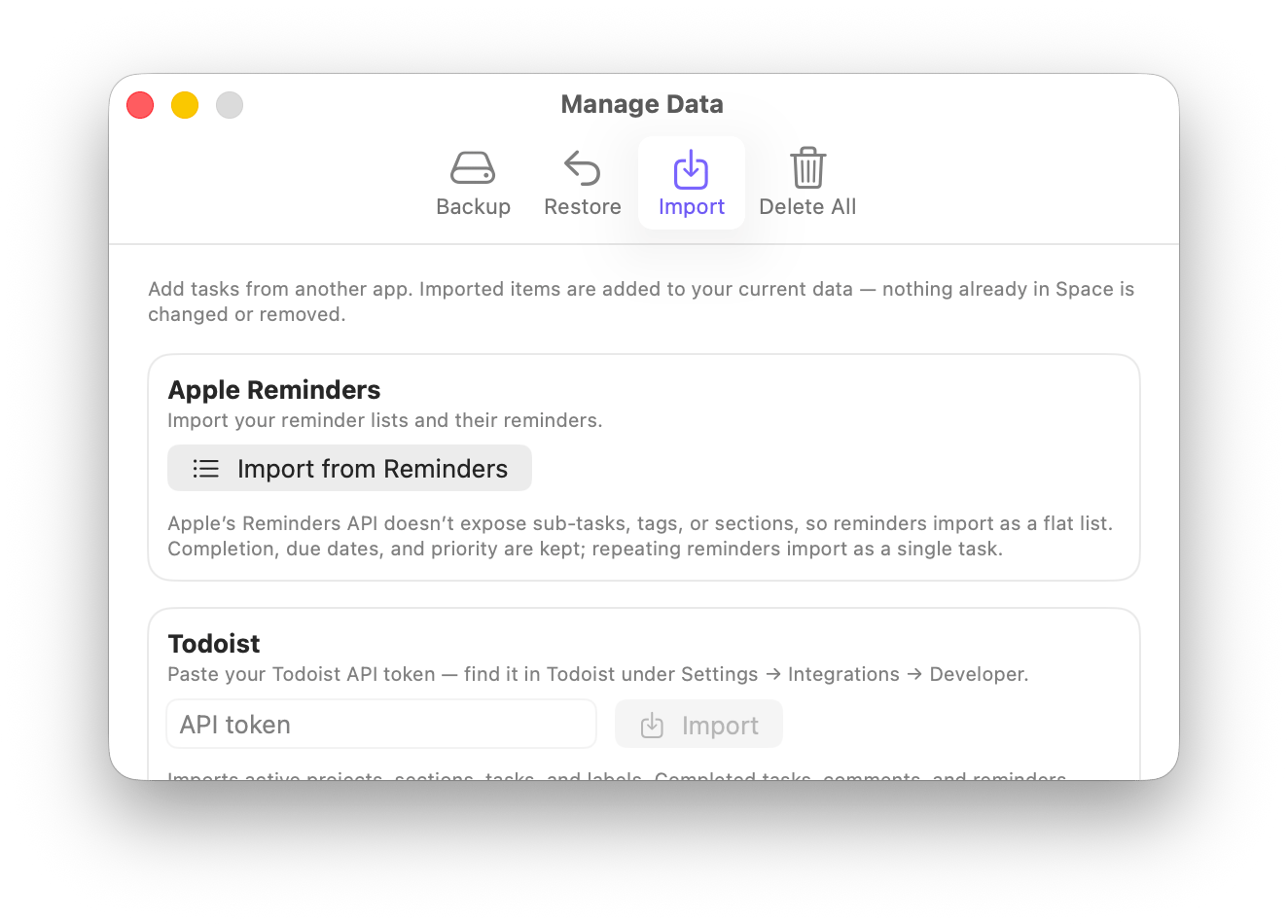 ## Apple Reminders
Click `Import from Reminders`. The first time, macOS asks for permission to read your reminders — Sonto
only asks at the moment you import, never before.
Each reminder list becomes a project, and your reminders become tasks, keeping their completion, due
dates, and priority.
Apple's Reminders system doesn't let other apps read sub-tasks, tags, or sections, so reminders come
in as a flat list. Repeating reminders are imported as a single task.
## Todoist
Todoist needs an API token so Sonto can read your data. In Todoist, go to `Settings` > `Integrations` >
`Developer` and copy your API token, then paste it into Sonto and click `Import`.
Your projects, sections (as headings), tasks, and labels (as tags) come across, along with due dates and
priority.
Imports your active tasks. Completed tasks, comments, and reminders aren't included. Sub-tasks and
nested projects are flattened into their project, and repeating tasks come in as a single task with
the schedule noted.
## Things
Click `Choose Things Database…`. Because Things keeps your data inside its own private folder, you'll
point Sonto at the Things database file so it can read it. Sonto starts the file picker near where
Things stores it.
Your areas, projects, headings, to-dos, and tags come across, and checklist items are kept as a
checklist inside the task's notes.
Things has a **Someday** list for to-dos you'll get to eventually. Sonto doesn't have a separate
Someday list, so these come in tagged **Someday** — keeping their project or area, just without a
scheduled day — so you can still round them all up in one place.
Items in the Trash and repeating-task rules aren't imported (repeating to-dos come in as their next
single task).
## Availability
Importing is a **Mac** feature, part of the Manage Data window.
## Related
Backup, restore, and delete your Sonto data.
A recipe for importing, backing up, and exporting.
## Apple Reminders
Click `Import from Reminders`. The first time, macOS asks for permission to read your reminders — Sonto
only asks at the moment you import, never before.
Each reminder list becomes a project, and your reminders become tasks, keeping their completion, due
dates, and priority.
Apple's Reminders system doesn't let other apps read sub-tasks, tags, or sections, so reminders come
in as a flat list. Repeating reminders are imported as a single task.
## Todoist
Todoist needs an API token so Sonto can read your data. In Todoist, go to `Settings` > `Integrations` >
`Developer` and copy your API token, then paste it into Sonto and click `Import`.
Your projects, sections (as headings), tasks, and labels (as tags) come across, along with due dates and
priority.
Imports your active tasks. Completed tasks, comments, and reminders aren't included. Sub-tasks and
nested projects are flattened into their project, and repeating tasks come in as a single task with
the schedule noted.
## Things
Click `Choose Things Database…`. Because Things keeps your data inside its own private folder, you'll
point Sonto at the Things database file so it can read it. Sonto starts the file picker near where
Things stores it.
Your areas, projects, headings, to-dos, and tags come across, and checklist items are kept as a
checklist inside the task's notes.
Things has a **Someday** list for to-dos you'll get to eventually. Sonto doesn't have a separate
Someday list, so these come in tagged **Someday** — keeping their project or area, just without a
scheduled day — so you can still round them all up in one place.
Items in the Trash and repeating-task rules aren't imported (repeating to-dos come in as their next
single task).
## Availability
Importing is a **Mac** feature, part of the Manage Data window.
## Related
Backup, restore, and delete your Sonto data.
A recipe for importing, backing up, and exporting.