> ## Documentation Index
> Fetch the complete documentation index at: https://help.sonto.app/llms.txt
> Use this file to discover all available pages before exploring further.
# Notes & Checklists
> Add detail to a task with notes, checklists, and formatting
Every task has a notes field for the detail that doesn't fit in the title — context, links, or a
checklist of smaller steps. The same editor powers your [reflections](/reference/glossary#reflection)
on the day, week, quarter, and project.
## Checklists (sub-tasks)
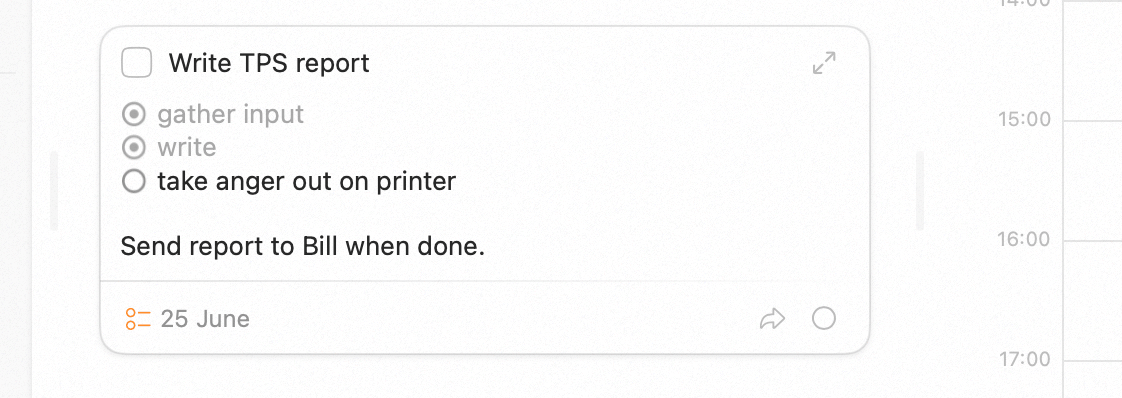
Inside a task's notes, type `[]` to insert a checklist item. Check items off as you go, and indent them
to create nested lists. This is the place for the small steps that make up a single task, without
cluttering your task list.
 ## Bullet lists
Type `- ` at the start of a line to begin a bullet list.
## Text formatting
Apply basic formatting as you write:
* **Bold** — Cmd + B
* *Italic* — Cmd + I
For the full set of note-editing shortcuts, see
[Keyboard shortcuts](/reference/other-topics/keyboard-shortcuts#when-editing-notes).
## Availability
Notes, checklists, and formatting are available on both **Mac** and **iPhone**. The keyboard shortcuts
above are for Mac; on iPhone, use the editor's formatting controls.
## Related
Everything a task can hold.
All the note-editing shortcuts.
## Bullet lists
Type `- ` at the start of a line to begin a bullet list.
## Text formatting
Apply basic formatting as you write:
* **Bold** — Cmd + B
* *Italic* — Cmd + I
For the full set of note-editing shortcuts, see
[Keyboard shortcuts](/reference/other-topics/keyboard-shortcuts#when-editing-notes).
## Availability
Notes, checklists, and formatting are available on both **Mac** and **iPhone**. The keyboard shortcuts
above are for Mac; on iPhone, use the editor's formatting controls.
## Related
Everything a task can hold.
All the note-editing shortcuts.