> ## Documentation Index
> Fetch the complete documentation index at: https://help.sonto.app/llms.txt
> Use this file to discover all available pages before exploring further.
# Repeating Tasks
> Tasks that come back on a schedule or when you complete them
See repeating tasks set up from start to finish.
A repeating task comes back automatically, so you only set it up once. Sonto supports two repeat styles
and can optionally add each occurrence to your calendar.
## Make a task repeat
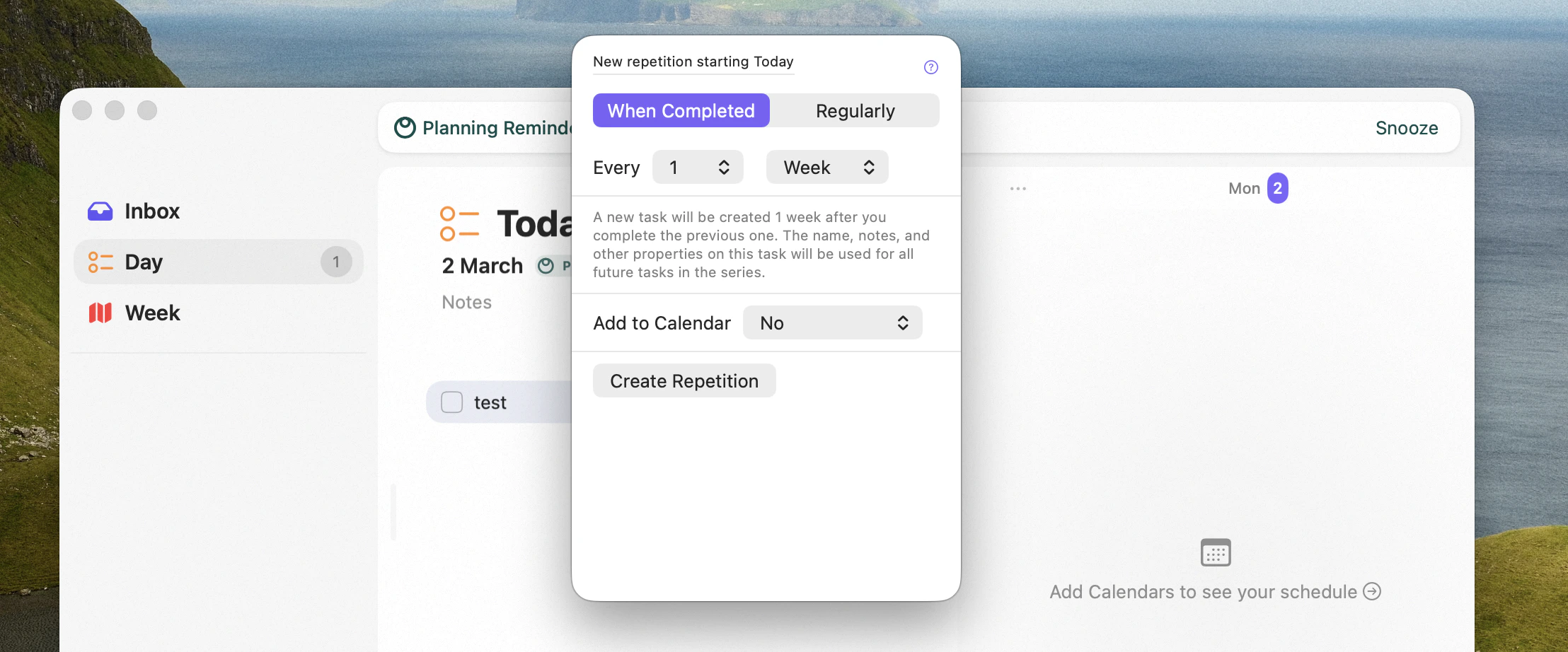
Open a task and choose **Edit Repetition** — on Mac you can also right-click the task and pick it from
the menu. From there you set how the task should recur.
 ## Two ways to repeat
* **On a fixed schedule** — the task reappears on set dates (for example, every Monday, or the first of
the month), regardless of whether you finished the previous one.
* **On completion** — the next occurrence is created only once you complete the current one. This suits
tasks where the interval matters from when you *actually* did it, like "water the plants every 5 days".
## Add repeating tasks to your calendar
A repeating task can also create a calendar event for each occurrence. You can have Sonto place the
event at a **fixed time**, or let it **find an opening** in your schedule that respects your working
hours and existing commitments — see [Auto-schedule](/reference/auto-schedule).
## Availability
Repeating tasks can be created and completed on both **Mac** and **iPhone**. Finding an opening for a
calendar event uses [auto-scheduling](/reference/auto-schedule), which is a Mac feature.
## Related
Let Sonto find a free slot on your calendar.
How events and time blocks work in Sonto.
## Two ways to repeat
* **On a fixed schedule** — the task reappears on set dates (for example, every Monday, or the first of
the month), regardless of whether you finished the previous one.
* **On completion** — the next occurrence is created only once you complete the current one. This suits
tasks where the interval matters from when you *actually* did it, like "water the plants every 5 days".
## Add repeating tasks to your calendar
A repeating task can also create a calendar event for each occurrence. You can have Sonto place the
event at a **fixed time**, or let it **find an opening** in your schedule that respects your working
hours and existing commitments — see [Auto-schedule](/reference/auto-schedule).
## Availability
Repeating tasks can be created and completed on both **Mac** and **iPhone**. Finding an opening for a
calendar event uses [auto-scheduling](/reference/auto-schedule), which is a Mac feature.
## Related
Let Sonto find a free slot on your calendar.
How events and time blocks work in Sonto.